Thursday, January 10, 2008

Yes it Snowed


It Snowed and Snowed...I caught this picture of a hawk waiting for prey in my backyard.

Friday, January 4, 2008

Trying the get Motivated

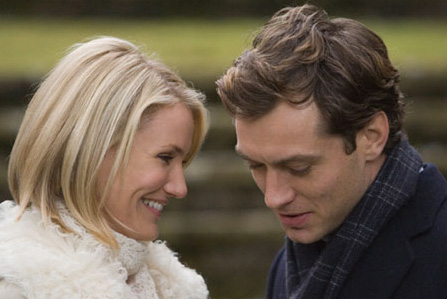
The hussle and bustle of Christmas is over. We are all reflecting on the new year. I have started my millionth diet. It is really gloomy out and raining like crazy (thank-fully not snow yet). It is cold and one of those days that you just want to snuggle with a blanky and watch a sappy movie. My twin 19 month olds are in bed and I should be working. But instead I want to match movies like:
The Holiday
Jude Law..ppullease...

Or

Under The Tuscan Sun........Marcello...Marcello!! There is always room for Hugh Grant on such a day.

Notting Hill .... Loved the "I'm just a Girl" line. And of course:
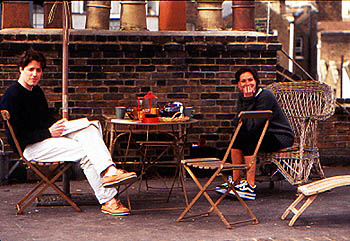
Bridget Jones's Diary
be still my heart...Collin Furth...
But I must get to work....boo hoo...
Wednesday, January 2, 2008

Photo Re-Shoot

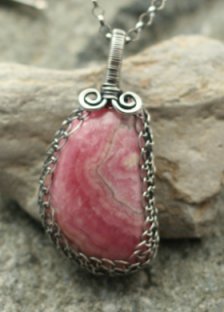
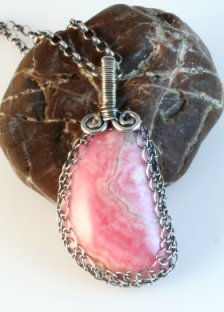
Here are picture of a necklace I made. First the old photo, second the new version. I am still not thrilled with the new one either. The stone seems to have a glare on it. It is a hand cut and polished Rhodochrosite. Gorgeous color and polish!! I made a net bezel for out of sterling silver. I may have to tinker with the photo some more.


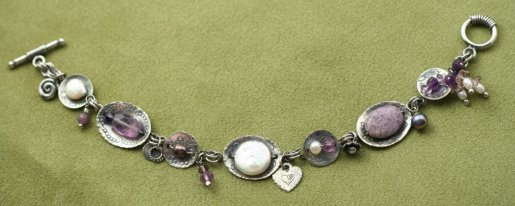
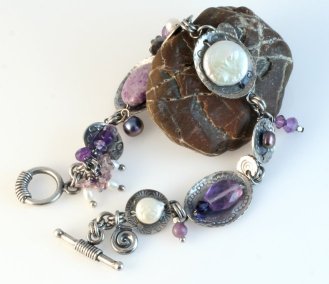
This second set is a 7-3/4" in length bracelet. Lightly dapped hand stamped sterling disks formed into cups that hold a delightful selection of pearls, Amethyst stones, Swarovski Crystal, misc bobbles and hand made sterling charms. It has a toggle closure. The first shot is the original picture...Boy it is not even in focus. The second I like much better. I added back a rock. I think it adds a bit of interest.


Sunday, December 30, 2007

Five Simple Steps to Better Product Photography

1) In order to ensure your images are sharp, make sure you know how to focus your camera. Digital cameras with auto focus are often difficult to focus precisely, especially when shooting small objects. Read your owner's manual and be sure you understand how your camera's auto focus operates. Most digital cameras are designed to easily focus on large objects but have difficulty on small subjects. It is often useful to put your camera in spot focus mode. Spot focus will give you more control over what part of a scene the camera is actually focusing on.
2) Use a tripod, even the slightest movement while taking a picture will cause motion blur. The closer you get to an object the more obvious the motion blur becomes. Even an inexpensive tripod will make a big difference in the sharpness of your images. For really sharp images it makes sense to invest in a good, sturdy tripod. If your camera has a remote shutter release then use it, if not then use the camera's built-in timer to minimize camera shake.
3) To get the largest area of your subject in focus put your camera in aperture priority mode and set the aperture to the highest number possible. The closer you get to your subject the more important this becomes.
4) Use soft lighting. Your camera's built-in flash will rarely give good results for product photography. For soft lighting either shoot outside on an overcast day or use a light tent like the EZcube®, or use a soft box.
5) Use image editing software. Even inexpensive software like Photoshop Elements™ can make your product photography much easier. It may seem like it's faster to use an image exactly as it was shot. But in reality, it is difficult to shoot an image precisely how you would like it to appear in it's final form. Image editing software allows you to crop an image, adjust it's exposure, sharpen the image and then resize it, often in less than 60 seconds.
The biggest difference between an amateur's product snapshot and a professional's product image are sharpness and lighting. Steps 1,2, and 3, will improve the sharpness of your images while Step 4 will improve your lighting. A minute spent editing an image will improve it further. Because these few steps seem so basic, it's tempting to ignore them. However, if you take the time to follow them, you will see a huge improvement in the quality of your images.


Thank-you EZcube®, for letting my steal your tips.


Photo Tips from EZ Cube

I have set up EZ Cube and am playing with it I hope this is my LAST photographic equipment purchase. (that is of course unless I must have the under-lighting table) It seems to be working. I have tweaked my style a bit. I removed all the cool rocks as I felt they were distracting and not enough contrast. I have gone all white. But it is to white? I may try adding one special rock or other natural item and see how it goes. I did use a branch of the Contorted Filbert bush to hang my earrings from. I grew the plant myself...OK I killed it and saved the branches..not meaning to of course(kill it that is). I fear my green thumb is similar to my photo skills.

Here are some tips from EZ Cube of exposure:

~Avoiding dark images when shooting against light backgrounds~
Cameras tend to underexpose images when capturing subjects with white or very light backgrounds. The easiest way to prevent dark, underexposed images is to use exposure compensation.
Most digital cameras have fairly easy-to-access exposure compensation controls (labeled as "EV" for Exposure Value). If your images are too dark, try adjusting the exposure compensation. A setting of +1 is a good place to start. If you end up setting the EV too high, the image will appear "washed out". Simply go back step or two until the exposure looks right.
View the different EV settings below. This demonstrates how changing a camera's exposure compensation setting can avoid exposure problems. In this example shot against a white background, the standard setting of 0 is too dark. An EV setting of +1.3 seems best for this shot.
For more photo tips and to see the EZCube visit http://www.ezcube.com/.
EV -1
EV 0
EV +1
EV +1.3
EV +1.6

Saturday, December 29, 2007

My Latest Dainty Charms


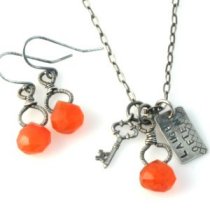
Hand wire wrapped Carnelian briolette, "laugh often" stamped word charm and a miniature key charm all on an oxidized sterling cable necklace. Chain length 19", Carnelian pendant 1" including bail. Toggle closure.
Hand wire wrapped Carnelian briolette all oxidized sterling silver. French ear wires. Total length 1".
Hessonite Garnet Faceted Briolette wire wrapped with sterling silver then oxidized. On delicate sterling silver earwires. Total length a bit over 1-1/4". Hessonite Garnet Faceted Briolette wire wrapped with sterling silver then oxidized. On a delicate sterling silver ball chain. 18" chain length, 1" pendant drop including bail.


Hand wire wrapped Blue Chalcedony briolette, "live fully" stamped word charm and a miniature bee charm all on an oxidized sterling cable necklace. Chain length 19", Chalcedony pendant a bit under 1" including bail. Toggle closure.
Hand wire wrapped Blue Chalcedony briolette with oxidized sterling silver. French ear wires. Total length a bit under 1".

LinkWithin

Blog Widget by LinkWithin